
Learning Solutions
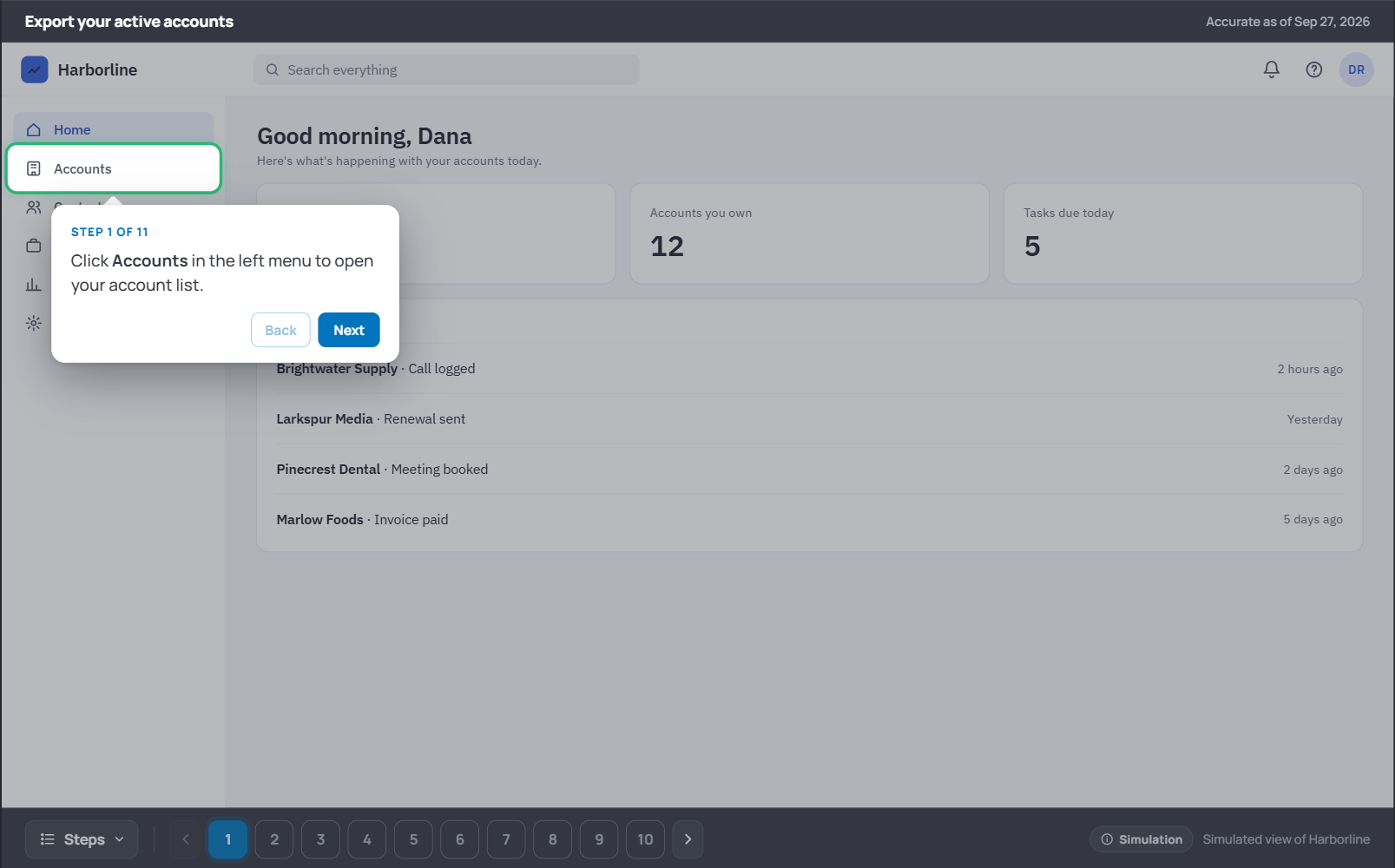
Select the image to open the mockup
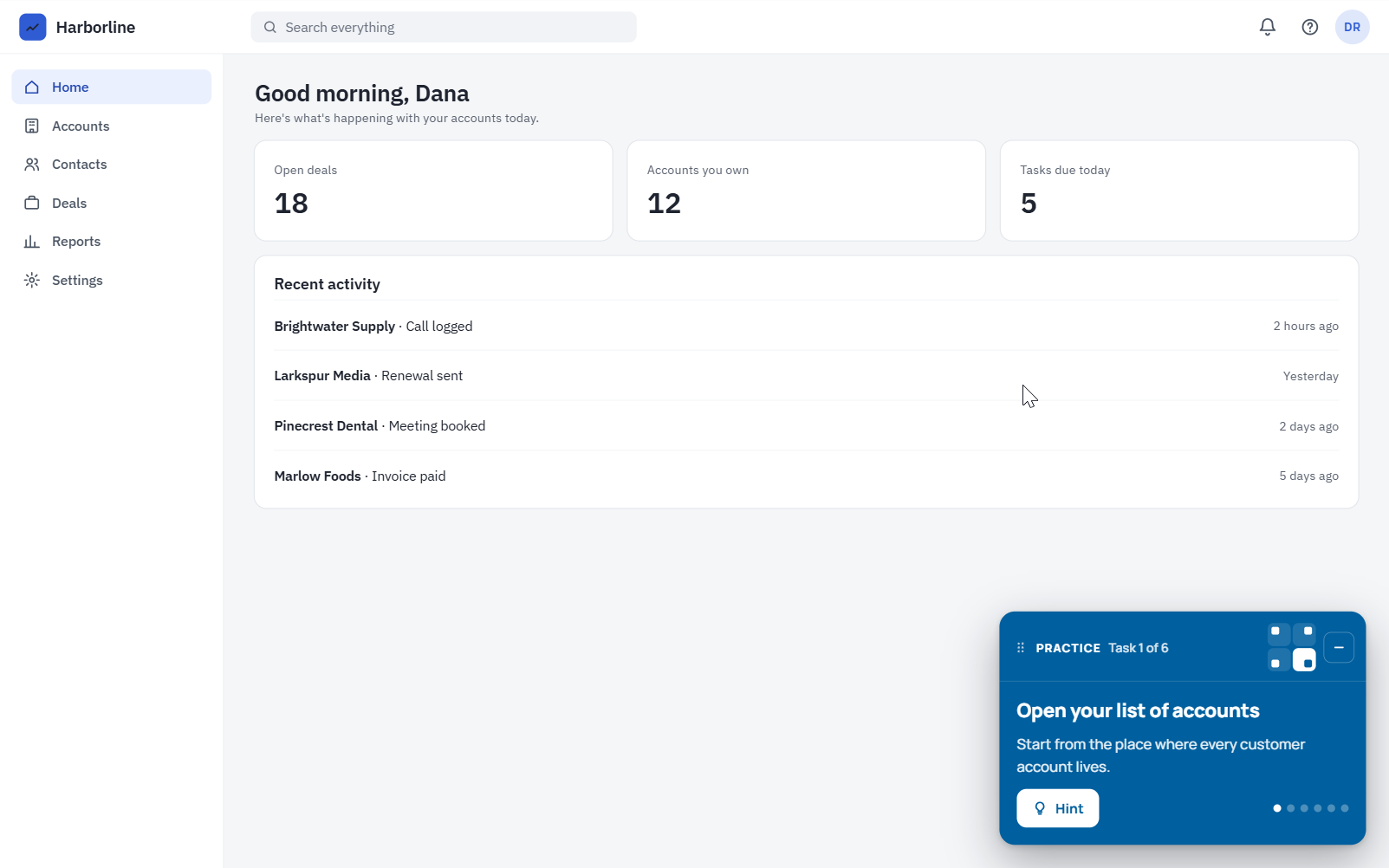
Select the image to open the mockup
AI-Powered Software Simulations & Workflow Guides
The Problem
Educating on SaaS workflows usually means screen-recorded videos or Storyline simulations. Both are slow to build, require significant rework with UI changes, and have significant development costs. In addition, most just-in-time support (the quick “how do I do this right now” help) is either simple text-based writing support, or outdated screenshots.
The Solution
I proposed and built an AI pipeline (custom Claude skill) that turns screenshots of a workflow into an interactive simulation of the platform. Each step is recorded once, with the screen, the action, and the instruction. From that single set of steps, the pipeline produces two tools:
A guide for just-in-time support. Learners move through numbered steps or jump to any step from a menu, with a pointer and spotlight showing exactly where to select. An autoplay mode walks through the whole workflow with narration.
A practice simulation for building skill. Instead of following instructions, learners get goals such as “Show only the accounts you own” and work out the steps themselves on a working facsimile of the workflow. A hint reveals the answer when they’re stuck, and a completion screen shows tasks completed and hints.
Design decisions
Scalable for content production. The pipeline recreates the platform workflow in HTML from screenshots alone. The simulation needs only brief notes on each step’s card text and selected option, and the guide adds just the instruction text and narration audio (generated with ElevenLabs).
Consistency through design. The skill includes a reference example and instructions. This allows multiple team members to generate consistent simulation and guide outputs using the shared skill.
Platform fidelity using design systems. Most AI screenshot-to-code tools estimate sizes and styles from the image, producing a close but inaccurate copy of the interface. This skill has the platform’s design system built in, so Claude identifies the components in each screenshot and rebuilds them from the real specs.
Different goals for different needs. The guide tells learners what to select. The simulation asks what they’re trying to accomplish, which is using for applying knowledge they learned in an eLearning video or user guide.
No sandbox needed. The simulations run on rebuilt screens with sample data, so they never touch the real application. This protects customer data and proprietary code, with no need for a DAP vendor contract.
Accessible by default. Everything works by keyboard, with screen-reader announcements and reduced-motion support.
Results
Cut simulation development time by 75%.
Produces the guide, a new just-in-time support tool, with no added developer time.
Expected to cost one-third of current authoring-tool costs over a year.

Welcome to Envestnet University
This video reviews the digital transformation of Envestnet University, which involved a complete redesign of the user experience (UX) and site architecture. This public-facing video is available on the Envestnet R2 2025 Technology Enhancements site.
The Problem
Envestnet University serves 100,000+ financial services professionals and 3,000+ employees, but the original learner experience made training hard to find and hard to finish. The site structure had grown over time without a clear organizing logic, content was not labeled by role or platform area, and content was often locked into full course Storyline files.
For a platform supporting advisors and employees on complex financial software, every extra click is time and productivity lost.
The Solution
I proposed, designed, and implemented a full redesign of the learner experience. Rather than adding content, the redesign focused on removing friction across several areas.
Information architecture. I restructured the site architecture so learners reach the right training in fewer steps, organized in multiple ways: platform area, user role, and content type. Flexible user paths allow a user to locate the content that matters to them in the moment.
LMS interface. I redesigned the learner-facing interface to simplify the journey from landing page to course completion. New tiles for each of these paths took users to a course page filtered to their selection.
Course redesign. I designed a new Storyline template to mirror Envestnet’s platform UX, so learners work in a familiar interface, and split courses into lessons so content is modular and easier to find. Later courses moved off Storyline entirely in favor of custom asset-based modules, making all content modular. Every course now shares similar structure and navigation, so learners don’t relearn the layout each time.
Design decisions
Less cognitive load, not more content. The design goal was to cut the effort spent navigating so learners could focus on learning. This shows in the results: session time fell while completion rose.
Flexible architecture. Rather than creating 20 custom course pages for platform area and role, I implemented code that funnels all user paths to a single course page and applies filters. This makes the user journey flexible and reduces LMS administration tasks.
Consistency as a learning aid. Shared templates mean the interface becomes familiar, so attention goes to the material rather than the layout.
Built to scale. The templates became production tools for the team, part of the frameworks that cut eLearning development time to half the industry standard.
Results
One year post-launch
Enrollment up 102%
Course completion up 71%
Total usage hours up 274%
Average session time down 41%

Performance Support Chatbot
The Problem
The organization had a lack of engaging just-in-time educational support materials. When a customer had a platform-related question, support teams could only point them to help center articles or full courses, so clients had to search through lessons and videos in hopes of locating the answer. Content that would answer many user questions existed, but nothing connected it to the moment someone needed help.
The Solution
I designed a Copilot Studio RAG agent for internal employees that turns existing training into just-in-time support. When a support agent asks a product question, it answers and provides:
An adaptive card with a link to the most relevant content in our public-facing client’s videos. This link goes to the moment the query is mentioned in the video.
Any relevant interactive HTML walkthroughs, job aids, and lessons in the client-facing LMS.
Responses lead with the video, then the other resources, then lesson information.
How it works
Knowledge base. eLearning video transcripts with timestamps tied to their lessons, walkthroughs, and job aids are kept in a single knowledge base. Transcripts are reuploaded when videos change, and all content is dated.
Moment-level links. The agent pulls the video link and the time the topic is covered from the transcripts, then procedurally builds a link that jumps to that point.
Reliable information. The link comes from the knowledge base, not the model, and a button opens it on our video hosting service. As all learning content has been vetted and the agent provides only a link, the agent will not provide false information to customer support or the client.
Designed for future needs. The knowledge base was designed for future organizational needs, such as a client-facing version of the chatbot. Only public-facing data is kept in the knowledge base.