
eLearning Examples
AI-Powered Software Simulations & Workflow Guides
Problem
Teaching SaaS workflows usually means screen-recorded videos or Storyline simulations. Both are slow to build, break whenever the interface changes, and give learners only one way to learn: watch, or click through. Just-in-time support, the quick “how do I do this right now” help, typically doesn’t get built at all because there’s no time left over.
Solution
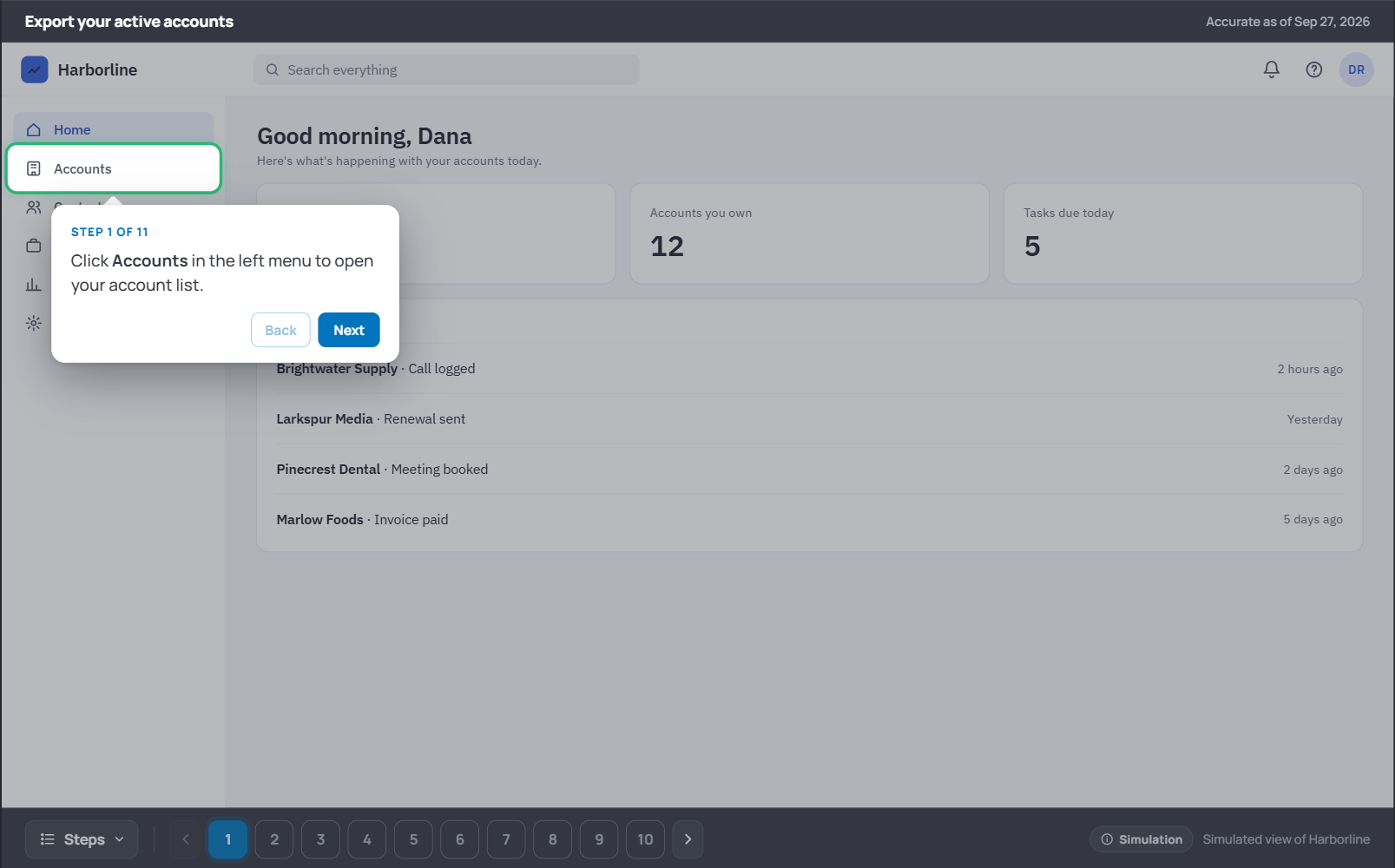
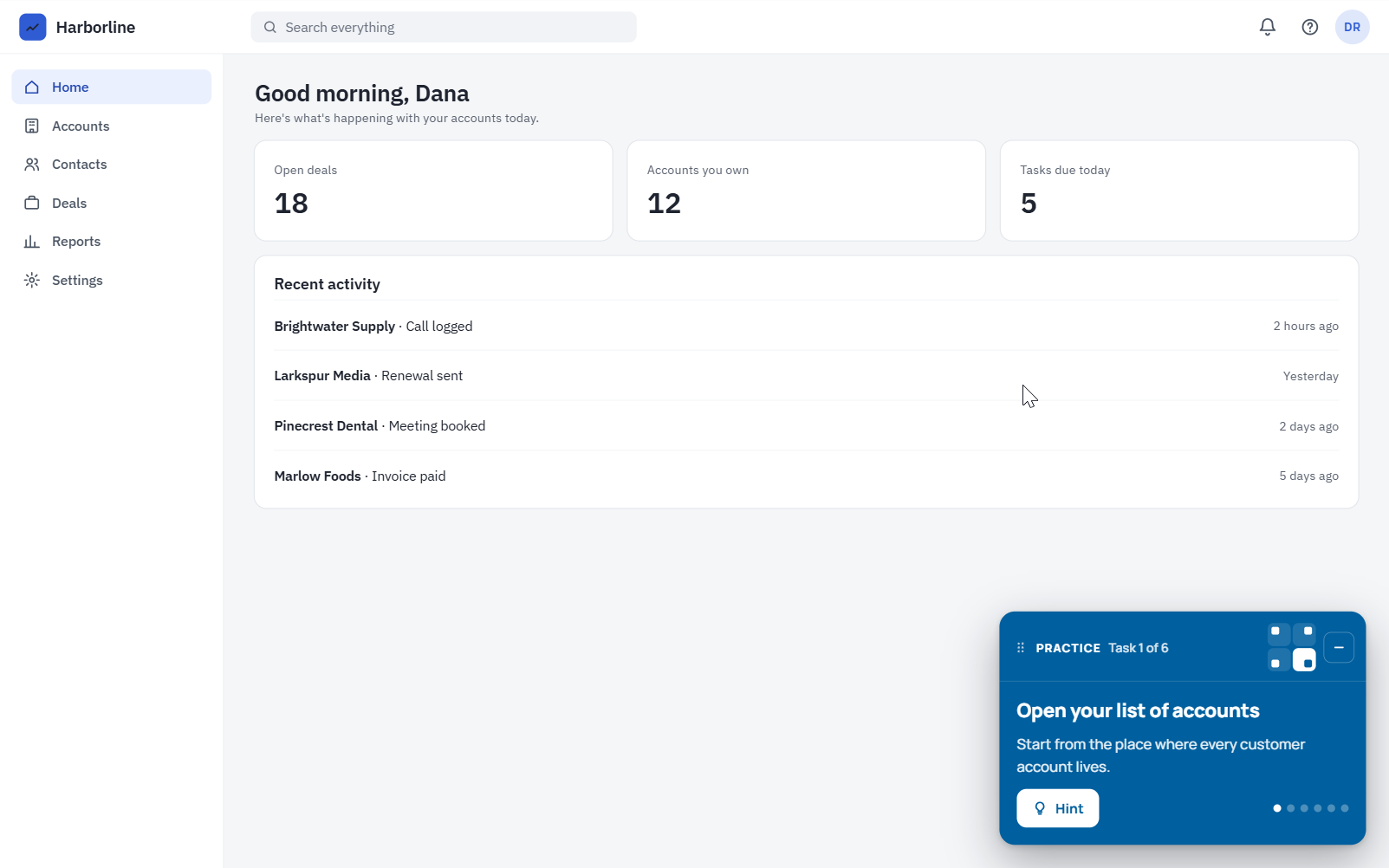
I proposed and built an AI pipeline (custom Claude skill) that turns screenshots of a workflow into an interactive simulation of the platform. Each step is recorded once, with the screen, the action, and the instruction. From that single set of steps, the pipeline produces two tools:
A guide for just-in-time support. Learners move through numbered steps or jump to any step from a menu, with a pointer and spotlight showing exactly where to select. A “Play” mode walks through the whole workflow with narration.
A practice simulation for building skill. Instead of following instructions, learners get goals such as “Show only the accounts you own” and work out the steps themselves on a working facsimile of the workflow. A single hint reveals the answer when they’re stuck, and a completion screen shows tasks done, hints used, and missed clicks.
Design decisions
Goals, not instructions, in practice. The guide tells learners what to select. The simulation asks what they’re trying to accomplish, which is the transfer they need on the job.
No live system needed. The simulations run on rebuilt screens with sample data, so they never touch the real application. This protects customer data and data security with no need for a vendor contract.
Out of the learner’s way. The task card can be dragged, snapped to any corner, or minimized, and it moves automatically when it would cover the next target.
Accessible by default. Everything works by keyboard, with screen-reader announcements, reduced-motion support, and “select” rather than “click” in instructions.
Results
Cut simulation development time by 75%.
Produces the guide, a new just-in-time support tool, with no added developer time.
Expected to cost one-third of current authoring-tool costs over a year.
Welcome to Envestnet University
This video reviews the digital transformation of Envestnet University, which involved a complete redesign of the user experience (UX) and site architecture. The initiative introduced a custom eLearning template with navigation mirroring the actual Envestnet platform. This design strategy was implemented to reduce cognitive load for clients, allowing them to focus on skill acquisition rather than interface navigation. This public-facing video is available on the Envestnet R2 2025 Technology Enhancements site.
What is Human Performance Improvement?
This video provides an overview of how Human Performance Improvement (HPI), and how it serves as a framework to drive actual return on investment through scientifically grounded interventions. By shifting the focus from individual behaviors to measurable organizational achievements, the video illustrates that true performance improvement is systematic and systemic.
Understanding How We Learn:
A Visual Guide Review & Application
This video review analyzes the book Understanding How We Learn: A Visual Guide through the lens of adult learning principles. It utilizes analogical learning techniques to break down complex concepts, offering actionable insights on how to design content that aligns with how the adult brain actually processes and retains information.